Training and course scheduling
Manage your course schedules and trainers effectively with our scheduling software. Easily find available trainer with the right skill to perform the job.

By providing an overview of the schedule through daily, weekly, monthly, and annual displays, companies can better organize sessions and ensure every detail is considered. The assignment of rooms and trainers is optimized to avoid conflicts and maximize resource utilisation. By taking trainer availability into account, the training agenda becomes a powerful tool for coordinating the needs of trainees, trainers, and participants, while ensuring the organization’s objectives are effectively met.
Key features for training course scheduling
Skill management
User rights
History and follow up
Plan your training sessions in advance
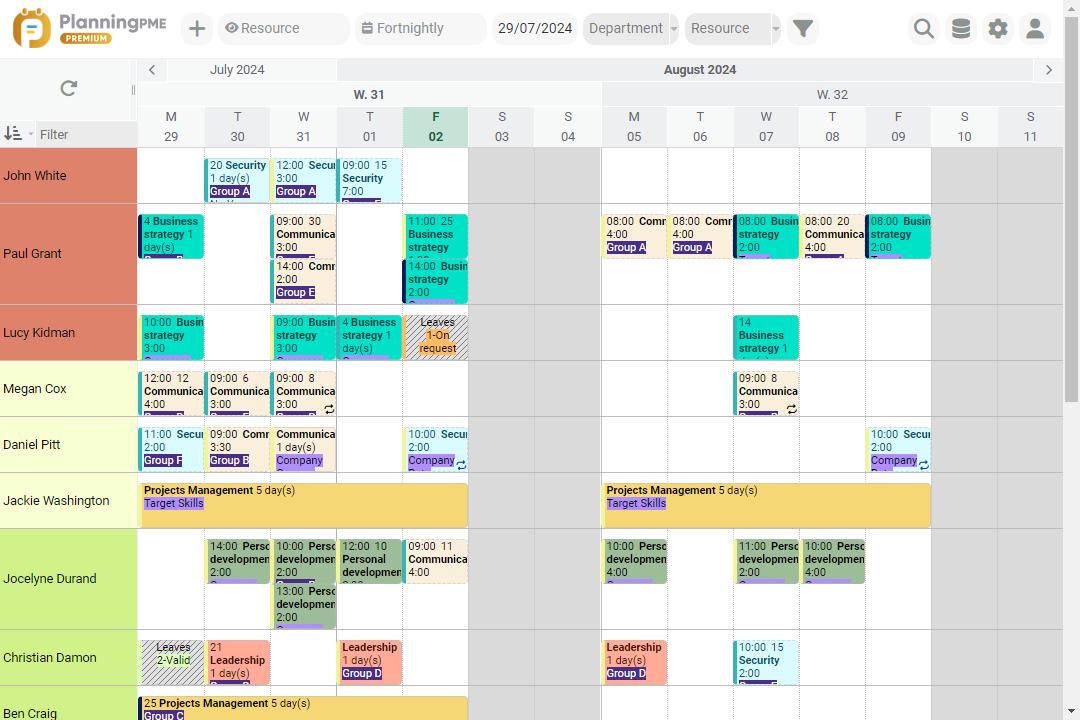
Our scheduling solutions can be used as comprehensive scheduling and training management tools for any companies that need to plan trainings and instructors. Number of instructors and courses is not limited so that you can schedule your activities in advance all along the year and have the daily, weekly, monthly schedule.
PlanningPME allows you to track scheduled training sessions in real time, facilitating the management of changes and unexpected events. With its analysis features and centralized view, decision-making is simplified, ensuring continuous improvement of planning processes.
Improve your day-to-day management of training sessions
Whatever your activity, training center, Human resources or OPCA schedule is a key tool to manage all your trainings. With our software training scheduling software, you can manage not only your training sessions but also the agenda for contributors, trainers and resources.
Centralizing all data in one scheduling board increases your quality service and enables you to deliver better customer service to your customers. With PlanningPME, nothing is easier than following sessions and, managing recurring tasks and associated deadlines. You can also look for resource availabilities and/or skills to perform a training and get analytical reports to know, for example, the number of sessions completed events per trainer, client…
Since history is stored inside your scheduling board, you can generate valuable, customized historical reports by room planning por example, or access any desired information anytime. Optimizing your human and material (such as rooms) resource scheduling on a daily basis makes your company and employees more productive.
Customers case studies - Testimonials
Testimonials
Our business is active in adult and professional training, we manage 80 lecturer colleagues and 15 classrooms with PlanningPME. We also carry out training at our clients' sites and we have found PlanningPME to be a good way of managing our sessions. After several months' research, we chose PlanningPME because it met the majority of our needs and our moderate budget. We are happy to testify to the excellent way this software matches our needs. The installation was very easy and the software met our expectations perfectly.


Discover the success story of our client Formatic
Formatic uses our tools to easily manage training sessions
Company Overview
Formatic Bordeaux is an existing limited company since 1996. It specialises in the field of computer and office training. We work in the field of development because we have expertise on the Office suite and other software. Formatic is located in Mérignac (33700). It has 6 classrooms, kitchen, break room on a surface of 400 m². Parking and restaurant, are available to guests. Formatic can also move its animators into the client company. It radiates throughout the South West of France and can, thanks to its network propose solutions, all over the territory.
Our scheduling needs
Before owning the PlanningPME software, Formatic had an empirical and impractical schedule. The facilitators were unable to know their internship schedule outside the company. Formatic did not have a scheduling solution on the internet .
Manage training sessions and alert your resources
Formatic has 4 PlanningPME licenses and Web Access access. Our coordinator schedules internships daily. She is responsible for piloting the schedule and resources. The commercial and myself can consult, modify sessions if necessary. Finally, our facilitators can consult, on the web, the sessions for which they are assigned.

Discover the success story of our client Dolbi
With PlanningPME, the Dolbi company can organize the schedules of internal trainers and subcontractors
Company Overview
Since 2000, Dolbi has been supporting business leaders in their quest to improve health & safety management. We offer training services for SST, PRAP, CSE, Fire, Forklift, Electrical Accreditation trainers, as well as the tools (virtual reality headsets, teaching tools...) which make it possible for companies to be completely autonomous with respect to training bodies and control services.
With a presence across all of France, we aim at businesses’ and organizations’ HR and Training Managers, to innovative trainers, specialized in health & safety security as well as employees wishing to acquire Health & Safety qualifications, grow and be recognized in their companies and generally to anyone wishing to further their training.
Our scheduling needs
We have to organize the internal trainers’ and subcontractors’ schedules and communicate to each of them the clients’ locations, terms and requests. At the same time, we plan trainers’ training sessions in Inter companies which customers enrol onto, and for which we must then organize rooms. We had to find a tool which was both simple to use but also complex enough to meet our needs.
Easily distribute the scheduling tool to your employees
We use PlanningPME on several cloud connected sites, which makes it possible in real time, wherever we are, to consult and change the scheduling tool and transmit this information to the trainers. The ease of setup and use saves us an incredible amount of time on a daily basis.

Discover the success story of our client Proactif
Our client Proactif uses the planning to schedule training sessions and deliver courses
Company Overview
Proactif supports you in the areas of training, consulting and project management since 1996. Based in Aigle, Switzerland. We operate throughout Europe. From personalized advice to corporate mediation or specialized training, we bring you tailor-made solutions in all areas of business management as well as individual follow-up. With a complete range of training, advice, audits and project management we offer Swiss Made quality in all our services.
With a team of 25 specialized collaborators and more than 60 external stakeholders, we are the preferred partner for your success
Our scheduling needs
We needed software that could meet the needs of our business to plan training, consulting and project management. None of those currently on the market are working really well for us. The planning was done on Excel, without satisfaction and with a lot of time and risk of errors. Our interventions and our courses, systematically adapted to a very varied clientele, require a very important flexibility and precise criteria.
Create dashboards through scheduling
PlanningPME is our main activity schedule and hour management software for our stakeholders. Also, it allows us to generate the hourly statistics that are included in our cost accounting and in our dashboards and objectives throughout the year.
FAQ
To create an effective training schedule, here are five key steps to follow:
- Define the training objectives : Clearly identify the skills or knowledge you want participants to acquire at the end of the training.
- Analyze the needs of the participants : Assess the current level of the participants, their specific needs, and their expectations.
- Structure the training content : Organize the modules or training sessions in a logical manner, defining a coherent pedagogical order.
- Develop a detailed schedule : Determine the dates, times, and durations of the training sessions. Schedule breaks, review times, and intermediate assessments.
- Communicate the schedule and prepare : Share the schedule with all participants in advance and ensure that the trainers are well prepared with the necessary materials.
Instructions for creating a training schedule on Excel
- Open Excel : Create a new document or use an existing template.
- Define the headers : Add column headers such as "Date", "Start Time", "End Time", "Module", "Trainer", "Location", "Participants", "Comments".
- Enter the dates : Fill in the "Date" column with the dates of the training sessions.
- Add the schedules : Indicate the start and end times for each session in the corresponding columns.
- Register the modules : Enter the subject or module of each session in the "Module" column.
- Assign the trainers : Mention the name of the responsible trainer in the "Trainer" column.
- Specify the location : Indicate the place where each session takes place in the "Location" column.
- List the participants : Note the names of the participants or groups in the "Participants" column.
- Add comments : Use the "Comments" column for any additional information, such as preparations or remarks.
- Format : Apply date and time formats, add colors to differentiate modules, and insert filters to facilitate navigation.
30-day free trial to boost your schedule management
Request a demo Free trial